Restaurant ERP vs POS: KDS, CDS, Foodpanda and the Back Office Explained

Amir Farid
8 min read

Quick answer: A POS takes the order and the payment. A restaurant ERP runs everything around it: the kitchen display (KDS), the customer display (CDS), waiter and rider apps, Foodpanda orders, stock deducted by recipe, purchasing, accounting, payroll and customer marketing, all on one database. If you have one counter and a short menu, a good POS is enough. Once you have a real kitchen, delivery, or a second branch, a POS alone starts costing you money in ways that don't show up on the bill.
Here's a pattern we see at almost every restaurant we visit before they switch systems. The counter has a decent POS. Next to it there's a Foodpanda tablet beeping. The kitchen runs on paper tickets pinned to a rail. Stock is counted in a register on Sunday nights. Salaries are in Excel. And the owner, who wants one simple number ("how much did I actually make on the Family Deal last month?"), can't get it from any of them.
None of these tools is bad on its own. The problem is that they don't talk to each other, so people become the integration layer. This article walks through what changes when they do.
POS vs. restaurant ERP at a glance
| POS only | Restaurant ERP | |
|---|---|---|
| Billing, tables, take-away | Yes | Yes |
| Kitchen tickets | Printed KOTs | KOTs + live kitchen display with timers |
| Delivery apps (Foodpanda) | Separate tablet | Orders land in the same queue |
| Stock | Item counts, maybe | Ingredients deducted per recipe, purchases, waste |
| Food cost per dish | Guesswork | Calculated from recipes and purchase prices |
| Accounts | Exported to an accountant | Journals posted automatically |
| Staff & payroll | Excel | Attendance, advances, payroll, payslips |
| Customers | Phone numbers | Segments, campaigns, loyalty, win-back |
The kitchen: KDS changes the whole tempo
A kitchen display system replaces printed kitchen order tickets (KOTs) with a screen. Orders appear in lanes, typically Pending, Preparing and Ready, each with a running timer. The chef taps a ticket to move it along, and the counter or the waiter sees the status instantly.
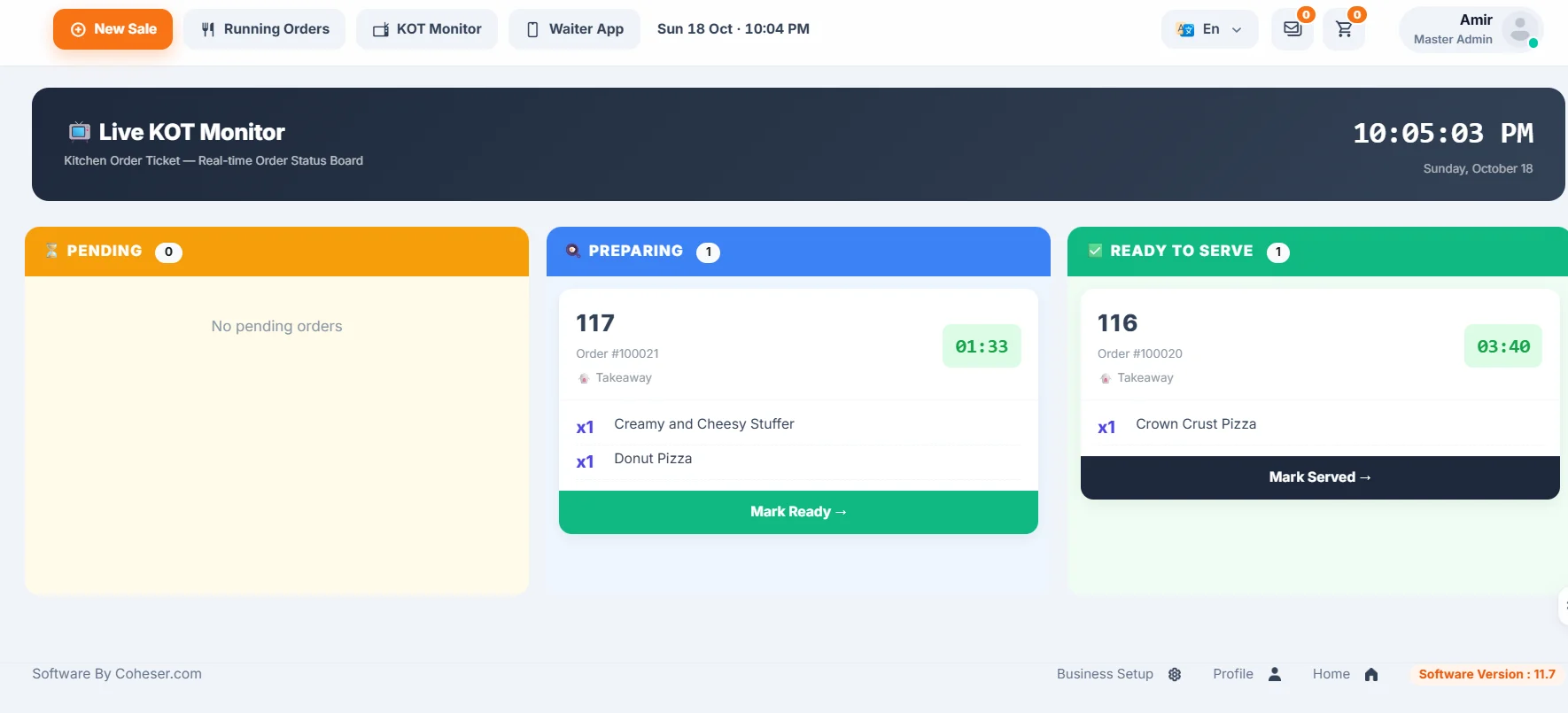
What owners notice first isn't the screen. It's the quiet. No more shouting "Table 6 ka kya hua?" across the pass. The second thing they notice, a few weeks later, is the data: average prep time per station, which items are always late, and which hour of Friday night the kitchen falls behind. You can't fix what you can't see, and paper tickets don't leave a trail.
A good setup also routes items to the right station. Pizzas go to the oven screen, shakes go to the bar printer, and when a waiter adds a second round to Table 6, only the new items fire, not the whole order again.
The counter: CDS builds trust and speeds up pickup
A customer display screen faces the guest. While the cashier rings up the order, the guest sees each item, any discount and the total. It sounds minor, but it cuts down on "I didn't order that" arguments and makes the discount visible, which matters when you're running deals. For take-away, the same screen can show a "now serving" board so people stop crowding the counter asking about their order.
Waiter and rider apps: the order starts where the guest is
With a waiter app, the order is taken at the table on a phone and goes straight to the kitchen. No walking back to the counter, no handwriting to decode. Waiters can add rounds, request the bill and see when food is ready.
For delivery, a rider app does the same job on the road: the rider sees assigned orders, marks pickup and delivery, records cash collected, and shares live location so both the branch and the customer can track the order. That last part, live tracking, is what customers have come to expect from the big delivery apps, and it noticeably cuts down "where is my order?" calls.
Foodpanda inside the POS, not beside it
If Foodpanda orders live on their own tablet, someone has to re-enter them into the POS, or they don't get entered at all. Either way, your stock, your sales reports and your tax reporting are off.
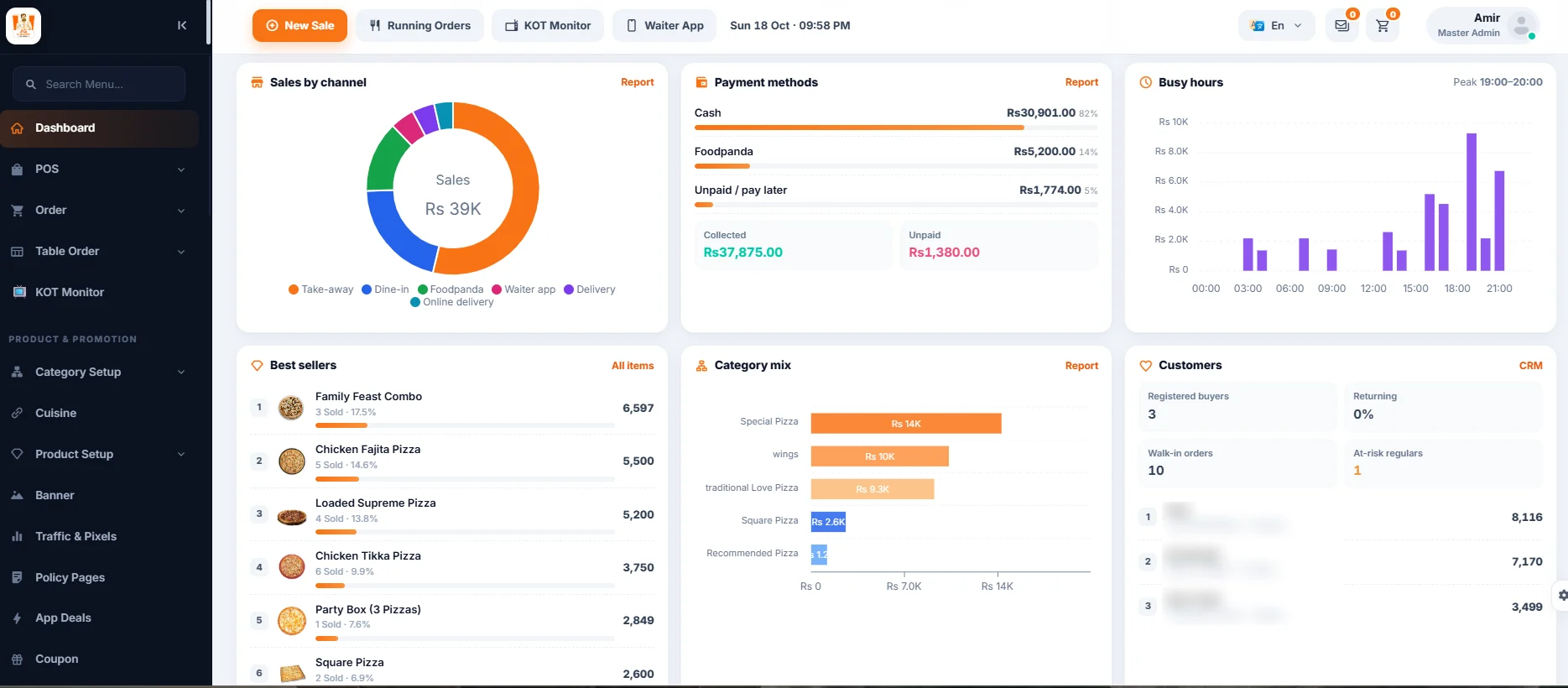
With an integration, Foodpanda orders arrive in the same running-orders board as dine-in and take-away. The cashier accepts or rejects, sets the prep time, and the order fires to the kitchen like any other. Because Foodpanda items are mapped to your menu, the right ingredients are deducted and the sale shows up in reports under its own channel. In our own dashboards, "sales by channel" (dine-in, take-away, delivery, waiter app, Foodpanda, online) is one of the first charts owners look at every morning.
Inventory: where restaurants quietly lose the most
Most restaurant owners we talk to know their sales to the rupee and their food cost to within, honestly, a guess. That's because stock in a POS is usually counted per item ("12 pizzas sold") rather than per ingredient ("3 kg of cheese used").
Recipe-based inventory fixes that. You define each dish as a recipe (200 g dough, 120 g cheese, 90 g chicken and so on), and every sale deducts those ingredients automatically. Add purchases from suppliers at real prices and you get:
- Food cost per dish, so you know which menu items actually make money.
- Re-order alerts before you run out of something mid-service.
- Variance between what the system says you should have and what's on the shelf, which is where waste and theft show up.
- Waste logs, so expired or dropped stock is recorded instead of disappearing.
Accounting, HR and CRM: the back office that runs itself
Once sales, purchases and expenses are in one system, the accounting entries can post themselves. Your accountant gets a ledger, trial balance and P&L instead of a pile of exports. Cash registers and shifts close with a Z-report, and a cashier's shortfall is visible the same night, not at month end.
HR follows the same logic: staff punch attendance, advances are recorded with vouchers, payroll is generated, approved and paid, and payslips print from the same place.
And because every order is tied to a customer phone number, CRM becomes possible: see who your regulars are, who hasn't come back in 30 days, and send them an offer. The "at-risk regulars" list is one of the most useful screens we've built, because winning back a regular is far cheaper than finding a new one.
Compliance comes built in
In Pakistan, your POS also has to post invoices to PRA, FBR, SRB or KPRA in real time and print the QR code on every bill. When billing, delivery orders and tax reporting are in one system, compliance stops being a separate job. We covered the details in our guide to FBR and PRA integrated restaurant POS.
When a POS is enough, and when it isn't
Stay with a simple POS if you have one counter, a short menu, no delivery, and you're the person counting stock. Move to an ERP when any of these is true:
- Your kitchen regularly falls behind and you don't know why.
- You take delivery orders from your own riders or from Foodpanda.
- You have, or plan, a second branch.
- You can't say what your food cost percentage was last month.
- Cash shortages are discovered days later.
SaaS or your own system?
There are two sensible ways to get a restaurant ERP. A SaaS subscription is hosted and maintained by the provider: you're live in days and updates are automatic. A custom project is installed on your own server with your branding, and your customer and rider apps are published under your name. Chains and franchises often prefer the second because they want to own the platform. We offer both for Coheser Restaurant ERP, and the right choice mostly depends on how many branches you have and how much you want to customise.
Frequently asked questions
What is the difference between a KDS and a KOT?
A KOT (kitchen order ticket) is the printed slip that tells the kitchen what to cook. A KDS (kitchen display system) shows the same tickets on a screen, with timers and status, so the counter and waiters see progress in real time.
What is a CDS in a restaurant?
A customer display screen faces the guest at the counter. It shows the items, discounts and total as the order is entered, and can also show a "now serving" board for pickup orders.
Can Foodpanda orders go directly into my POS?
Yes, with an integration. Orders appear in the POS with accept, reject and prep-time controls, fire to the kitchen and deduct stock like any other order.
Does a restaurant ERP work without internet?
The better ones use an offline-first desktop POS that keeps billing and printing during outages and syncs everything when the connection returns.
How long does it take to switch?
For a single branch with a ready menu, a few days. Multi-branch rollouts with recipes, opening stock and staff training usually take two to four weeks.